GUIDE · V1
Community
Buyer profiles and purchase history
The Community page shows all buyer profiles: people who have purchased tickets, registered an account, or accepted a guest invitation.
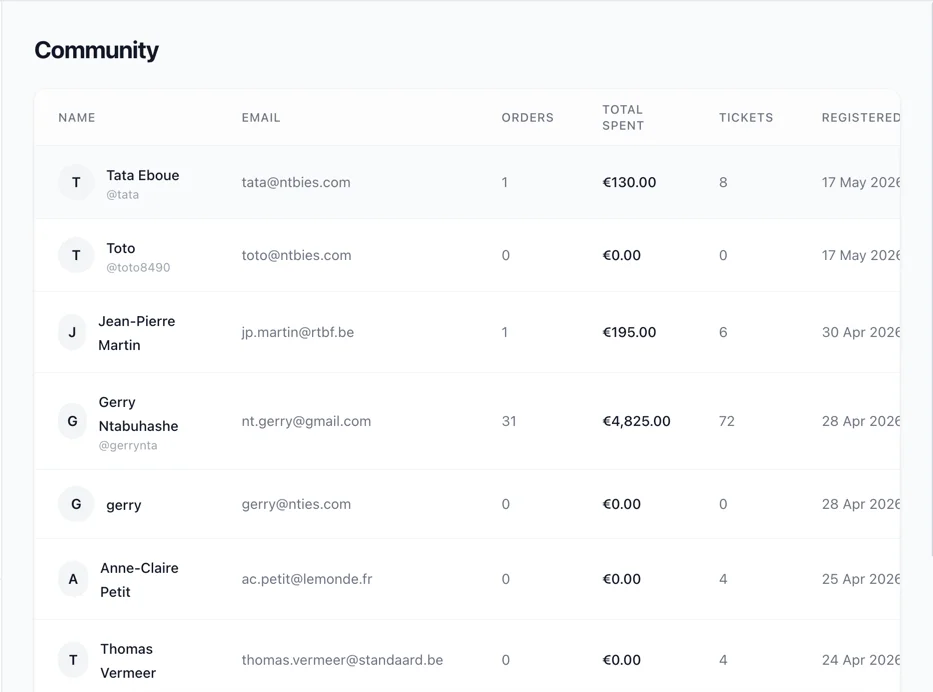
Community Members Table
| Column | Description |
|---|---|
| Name | Full name with avatar (clickable link to detail page) |
| Buyer's email address | |
| Orders | Number of orders placed |
| Total Spent | Sum of all completed orders |
| Tickets | Total number of tickets held |
| Registered | Account creation date |
Click any name to view the full profile.
Note: Community members are created automatically when someone:
- Purchases tickets through the checkout flow
- Registers an account on the buyer portal
- Accepts a guest invitation
You cannot manually create community members from the admin panel. To add contacts for invitations, use the Guests page instead.
Member Detail
Profile Header
- Avatar (initials)
- Full name
- Email (with mail icon)
- Phone (if set)
- Registration date
- Password status: shield icon shows whether the member has set a password (has a direct login) or not (magic-link only)
Statistics
Three metric cards:
- Orders - Total number of orders
- Total Spent - Sum of all order amounts
- Tickets - Total number of tickets across all events
Orders Section
Table showing the member's order history:
| Column | Description |
|---|---|
| Order ID | First 8 characters (monospace) |
| Event | Event name |
| Total | Order amount |
| Status | Order status badge (Pending, Completed, Expired, Refunded) |
| Date | Order creation date |
If no orders exist: "No orders yet."
Tickets Section
Table showing all tickets held by this member:
| Column | Description |
|---|---|
| Event | Event name |
| Ticket Type | Type of ticket |
| Status | Ticket status (Issued, Checked In, Revoked, Expired) |
| Issued At | When the ticket was generated |
If no tickets exist: "No tickets yet."
Difference Between Guests and Community
| Guests | Community | |
|---|---|---|
| Created by | Admin (manually or CSV import) | Automatically (purchase, registration, invitation acceptance) |
| Purpose | Contact database for sending invitations | Record of all buyers and attendees |
| Can be edited | Yes (name, email, phone, company, notes) | No (read-only in admin) |
| Can be deleted | Yes | No |
| Has an account | Not necessarily | Yes (email at minimum) |
Looking for a ticketing solution for your venue or festival? See our plans →